


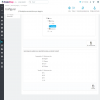


Allows the sellers of your market to select the product features according to the default category that they have chosen.

Downloaded more than 50 times
favorite_border Add to my wishlist in the first yearWHAT THIS MODULE GIVES YOU
FEATURES
This module allows sellers to select the product features according to the category they have chosen as the default.
On the add and edit product page, when the seller chooses a predetermined category for his product, the features and values associated with that category appear.
In this way, confusion is avoided by not presenting all the features created in the Backoffice for all products.
With the installation of this module, both the features and their values can be filtered by category.
The configuration of the module is very simple. As an administrator you can choose a category to view and select the features and associated values.
For each category you can choose the features and values to appear in the seller's product creation and edition form.
First of all, click "Add new module" at modules tab on back office. You will find it in the top right. After that, select packaged file you have downloaded and click "Upload file". Now your module appears on modules list. Click on "Install", and "Configure" next.
You can also unload .zip file and upload it into your modules directory. In this way you will install and configure module from modules admin.
It is very important that you thoroughly review all the documentation of the products we sell, try the demonstration and ask us any questions you have before making the purchase because product returns are not allowed, since it is non-encrypted software and it is not a tangible product.
Once sold a licences, the amount will not be returned under any circumstances except for causes attributable to this entity, in that case the origin of the problem will be studied to try to solve it by dedicating the maximum capacity to it.
In case the product is not working in your store, we will need the access data to the site (FTP and backoffice mainly) to review and solve the problems.
Only in the event that the problem could not be solved would the refund be issued.
Refund requests will not be considered if the purchase was made more than 3 months ago.
The purchase of this module includes 12 months of technical support and updates and is tacitly renewed at the end of the period.
You can cancel your subscription at any time before the end of the current period.
Download security updates.
Download compatibility updates.
Download evolutions and new functionalities.
Unlimited assistance.
Installation.
The adaptations with the different types of template.
The specific modifications or customizations that you need to make in your shop.
Solve problems related to the template, incompatibilities with third-party modules or third-party service problems such as hosting limitations among others.
Take a look at the hour bag service we offer.
View hour bag
Añade un bloque en una de las columnas de tu tienda para visualizar el número de usuarios que hay en linea.
Allows sellers to request or schedule their vacations to rest from the daily work of the marketplace.

Allows sellers to add an advertising image (banner) to the top of their seller profile or shop page.

Allow customers to pay with credit card in your market. It allows sellers to connect their Stripe account with the market to receive...
Allows customers to negotiate the price of products and the products of the marketplace sellers.

Allows customers to find products from the market vendors in their area. Search engine that allows customers to find products from...

Allows the marketplace's sellers to add links to all your social networks in your profile of seller or page of your store.
Allows sellers to add your geographic location to display a map on your seller profile. Shows a map with all the sellers located on the...
Allow sellers to add new categories in your marketplace. The sellers help to enlarge or improve the category tree of your marketplace.
Charges a monthly, quarterly or annual fee to sellers for the use of the market. Subscription period to sell in the market.
Allows customers to find products from the market vendors in their area. Search engine that allows customers to find products from...

Allows the market sellers to add offers to their products. Sellers can select the product, type of reduction, reduction and whether the...
Allows the sellers of your market to select the product features according to the default category that they have chosen.


