
Search in blog
Categories
Related products

JA Marketplace Professional
Create your own MarketPlace allowing your customers register as sellers for sell their products in exchange for a commission.
- Online only
JA Marketplace new version 6.1.0
Major update of the JA Marketplace module in which many improvements have been added, among which we highlight changes in the import system, combination generator, features with multiple values and much more.
Recent changes:
VERSION 6.1.0 (17/04/2019)
- * ADD: new function SellerProduct::getProducts()
- * ADD: seller can add multiple values for a feature (available in PretaShop 1.7)
- * ADD: seller can add custom value for features (available in PretaShop 1.7)
- * ADD: addproduct and editproduct template optimization (available in PretaShop 1.7)
- * ADD: declination message form without popup window (available in PretaShop 1.7)
- * ADD: image, reference, price and quantity is displayed in seller product list (backoffice) (available in PretaShop 1.7)
- * ADD: big changes and improvements in the selection of combinations by the seller
- * ADD: deactivate product quantity field when there are combinations
- * ADD: now the seller can add the final price with taxes included
- * ADD: importer with ajax and progress bar
- * ADD: use select2 plugin to add selectors with search input
- * ADD: improve the appearance of the secondary buttons
- * ADD: input type file translatable
- * ADD: use code mirror plugin for custom css styles
- * ADD: join forms in the module configuration
- * ADD: bar graph on seller dashboard
- * ADD: big improvements in filter date dashboard
- * ADD: use getAdminLink
VERSION 6.0.47 (11/04/2019)
- * ADD: now duplicate store names are not allowed
- * FIX: optimization in edit range of carriers
- * ADD: delete range in edit carrier
- * FIX: when there is an error in the add product form, a wrong combination is created
- * FIX: default category erroneous when you want the seller to add a single category for your products
- * FIX: use registerJavascript
- * ADD: related modules in module configuration
---
In this update, there is a minor update that corresponds to version 6.0.47 where they have been fixed and added some details that can not be missing. In parallel, we have been working on a major update that brings new features that you will surely like.
Below we indicate in detail the improvements and arrangements that have been applied:
We have applied better control to avoid duplicating the name of the sellers' stores. Two stores with names equal to time is not allowed.
We have made optimizations in the edit carrier page. Now there are more possibilities to add and remove price range or weights.
Now it is possible to eliminate price ranges or weights in the edition of the carrier by the seller.
In the SellerProduct class we have added a new function that returns all the products created by the sellers. This function can be used by some add-ons.
Only in PrestaShop 1.7 now the seller can add multiple values for the features and can also add custom values for each of them.
The most important pages of the market that allows the seller to add and edit the product have been optimized reducing its code and size.
An issue that creates a meaningless combination with an amount equal to 0 has been corrected if the seller does not fill in all the required fields and click on the Save button when adding a product.
The option that allows adding criteria for comments or valuations of the seller was hidden. It has been enabled in this version.
Now the vendor account and vendor product declination form is no longer displayed in a pop-up window using Fancybox. Now when clicking on the 'Reject' button, a panel more visually adapted to the administration panel appears.
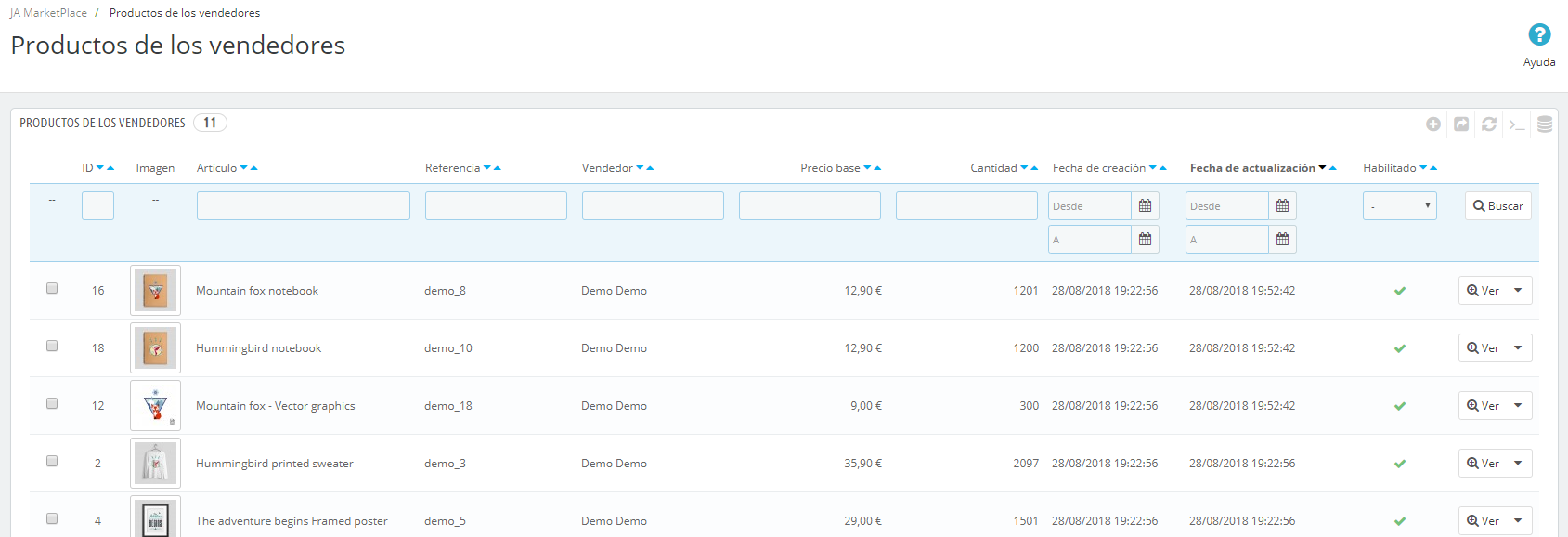
The product image, reference, base price and quantity are now shown in the seller's product list in the Backoffice.
Fixed a problem related to the type of category selector for the seller. When the option 'Sellers can only choose a category for their products' is enabled, the default category was not correctly assigned.
The system to create the product combinations has had important changes and improvements. Now the seller can add combinations for their products faster and easier. From the add and edit product page it is possible to generate combinations automatically.
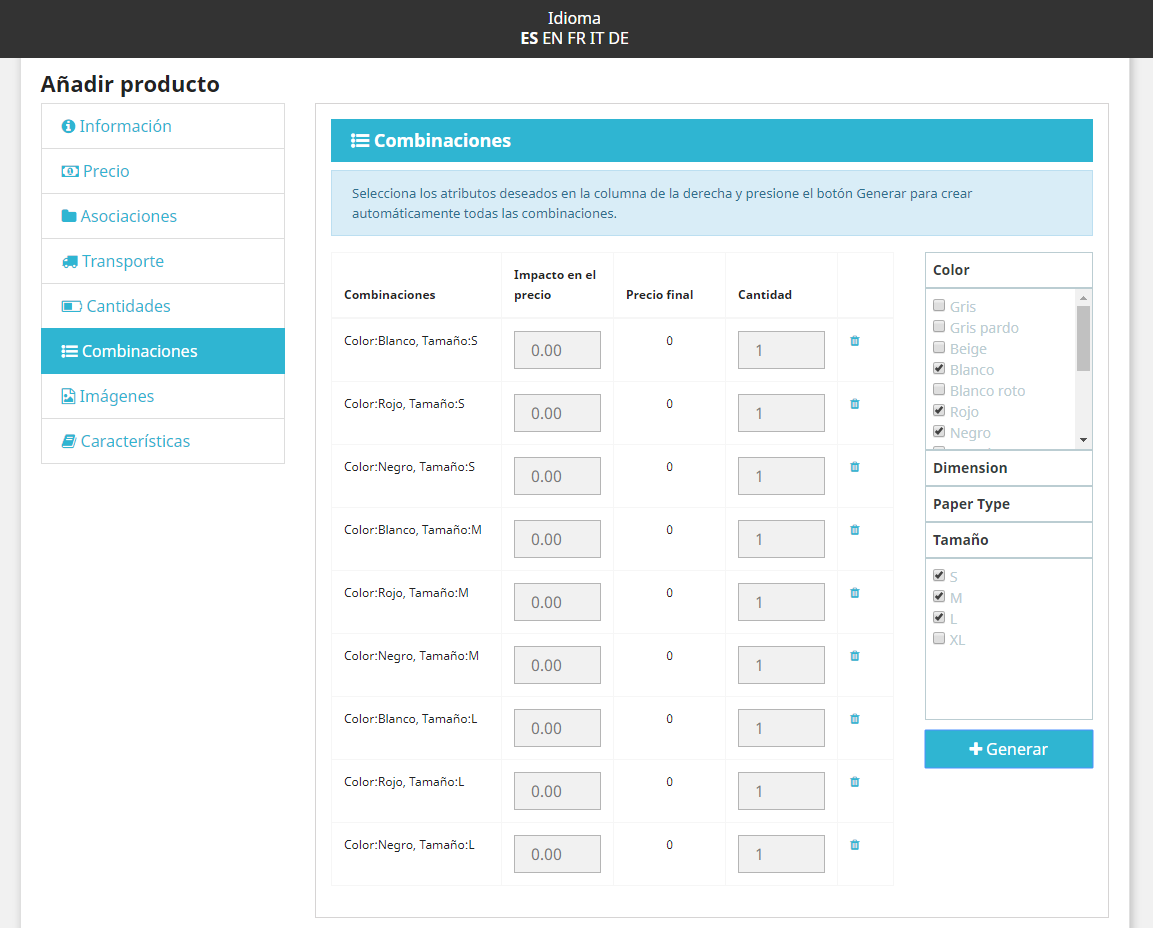
Once the combinations have been generated, the seller can indicate the impact on the price and quantity of each combination. The final price of the product appears visible. From the edit product page it is now also possible to change the default combination.
The generic quantity field is now automatically deactivated when the product has combinations. In this case, the units must be specified for each combination. The generic quantity field is auto filled with the quantities that are specified in the combinations.
Now the seller can add the final price with taxes included from the add and edit product page.
Fixed an important issue related to performance. In previous versions when Smarty Cache parameters are activated in the store for the JavaScript, the Tinymce plugin used for the product's text editor disappears due to its incompatibility. In this update we have made Tinymce and Smarty Cache for JavaScript compatible. The text editor for the descriptions is now always available.
The CSV importer has technically changed radically. Now the import is executed via ajax and informs the seller of the status of the import with progress bar and elapsed time while the process is running.
The error and confirmation messages returned by the import process have been improved and are now translatable.
The error report is now saved in the database with the vendor's language instead of a txt file.
We have included the select2 plugin in the seller's account to allow you to search in the selectors of categories, manufacturers and suppliers, among others. In this way, the seller can more easily find the item he is looking for to associate it with his product.
We have improved the appearance of the secondary buttons inside the seller account.
We are now using the Code Mirror plugin so that the site administrator can add custom styles for visual adaptations with the active theme.
New tab of related modules in the module configuration.
Big changes have been applied to the market earnings graph and the sales summary of the seller account.
In the seller account now the graph is bar type. It is not linear.
The filter by date is now more complete and both the administrator and the seller can visualize sales, expenses and benefits in:
- specific days
- the current day
- the previous day
- the current month
- the last month
- the current year
- past year
We recommend that you watch the current video where you can see almost all the details.